- March 10, 2026
- 0 Comments
- By l3admin
The Essential Eight SMEs: A Guide to Local Cyber Security
In the digital landscape, protecting your business is no longer optional. As World continues to grow as a hub for innovation and entrepreneurship, the cyber threats targeting our local SMEs have become more sophisticated. At L3 Consulting, we have spent over 8 years providing tailored IT support and managed services to the business community. We understand the unique challenges faced by firms. This guide explores the Essential Eight, a framework designed by the Australian Cyber Security Centre (ACSC) to help businesses like yours build a robust defence against cyber threats.
What is the Essential Eight for Adelaide SMEs?
The Essential Eight is a prioritised set of eight mitigation strategies designed to protect an organisation’s internet-connected information technology networks from various cyber threats. By implementing these strategies, South Australian small and medium enterprises can significantly reduce their vulnerability to common attacks like ransomware and data breaches.
At L3 Consulting, we’ve helped numerous local businesses navigate these requirements. In our 8+ years of serving the Adelaide and Melbourne regions, we’ve seen how a structured approach to cyber security can not only protect data but also build trust with clients and partners. Whether you’re a boutique law firm near Victoria Square or a growing manufacturer in Mawson Lakes, these eight pillars form the foundation of your digital safety.
The Eight Mitigation Strategies
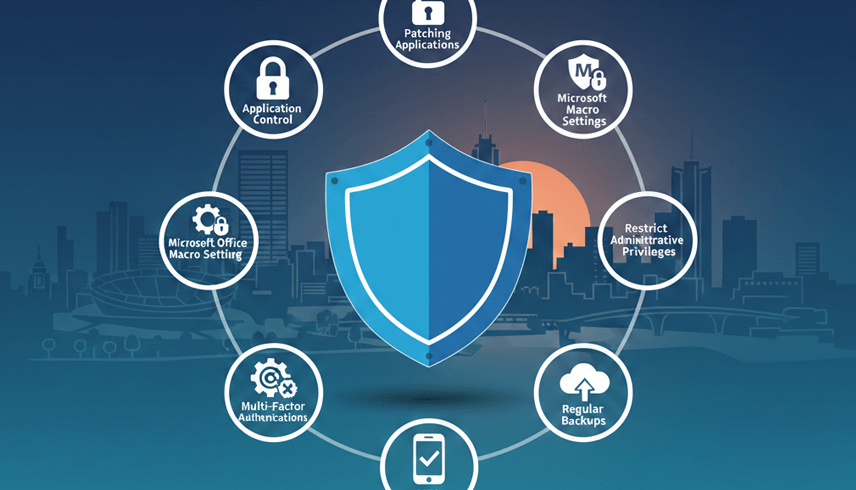
The Essential Eight is divided into three primary objectives: preventing cyber attacks, limiting the impact of an attack, and recovering data.
1. Application Control
This strategy involves ensuring that only approved software can run on your business systems. By preventing unapproved applications from executing, you block a major pathway for malware. In our experience, many Adelaide SMEs unknowingly run “shadow IT” that can introduce significant risks.
2. Patch Applications
Cybercriminals often exploit known vulnerabilities in software. Patching involves updating your applications (like web browsers, Microsoft Office, and PDF viewers) to the latest versions. We recommend a proactive approach, especially for critical updates that should be applied within 48 hours of release.
3. Configure Microsoft Office Macro Settings
Macros are powerful tools for automation but are a common vector for phishing attacks. Restricting macros to only those with a legitimate business need—and blocking those from the internet—is a vital step.
4. User Application Hardening
This involves configuring web browsers and other applications to block unnecessary and risky features. For example, disabling Flash or Java in browsers can close off entry points for attackers.
5. Restrict Administrative Privileges
Not every employee needs “admin” access to their computer. By limiting these privileges based on job roles, you ensure that if an account is compromised, the attacker’s ability to move through your network is severely restricted.
6. Patch Operating Systems
Just like applications, your operating systems (Windows, macOS, etc.) need regular updates. We’ve seen local businesses hit by ransomware simply because an old server at a secondary site in Port Adelaide was forgotten and left unpatched.
7. Multi-Factor Authentication (MFA)
MFA adds an extra layer of security beyond just a password. Whether it’s a code sent to a phone or a physical security key, MFA is one of the most effective ways to prevent unauthorised access.
8. Regular Backups
If the worst happens, having a reliable, off-site backup is your safety net. We always advise our clients to test their backups regularly to ensure they can actually be restored when needed.
Maturity Levels and Implementation
The ACSC uses a “Maturity Model” to help businesses gauge their progress. Most Adelaide SMEs should initially aim for Maturity Level 1, which provides a baseline protection against opportunistic attacks.
Essential Eight Maturity Levels Comparison
| Maturity Level | Target Threat Actor | Key Characteristics | Recommended For |
| Level 1 | Opportunistic/Untargeted | Basic implementation of all 8 strategies; focuses on common vulnerabilities. | Most small Adelaide businesses and sole traders. |
| Level 2 | Targeted/More Skilled | Enhanced controls; addresses more sophisticated social engineering and phishing. | SMEs with sensitive client data or higher profiles. |
| Level 3 | Highly Targeted/Persistent | Comprehensive, automated controls; protects against advanced, persistent threats. | Government contractors and large enterprises in SA. |
Why Local Context Matters for Your Security
Living and working in South Australia means we deal with specific environmental and economic factors. For example, the extreme heat during Adelaide’s summer can impact on-premise hardware if not properly cooled, making cloud-based backups even more critical. Additionally, as we support businesses across both Adelaide and Melbourne, we see how interstate collaboration requires seamless, secure remote access.
We’ve found that local landmarks aren’t just for navigation; they’re part of our shared community. When we talk to a client near the Adelaide Oval or the Central Markets, we’re talking to a neighbour. Our 8-year history in the region means we aren’t just an IT provider; we’re a partner invested in the success and security of the South Australian economy.
With over 8 years of experience in the Adelaide and Melbourne markets, we provide comprehensive audits, implementation roadmaps, and ongoing managed services. We take the technical burden off your shoulders so you can focus on running your business.




Leave a comment